Does Photoshop have Nano Banana Pro? Is It Free?
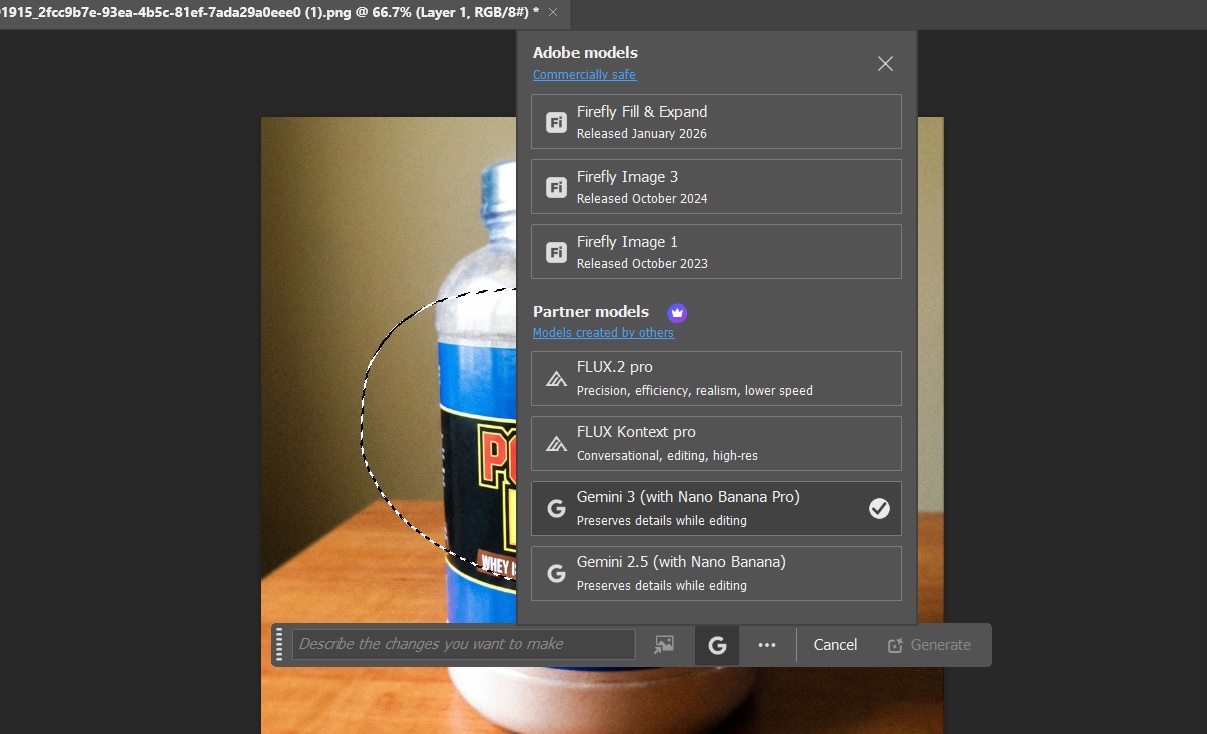
Yes, Photoshop has both Nano Banana and Nano Banana Pro. It can be used by setting it as the model inside the Generative Fill feature, like shown in the image below:
Is it Free?
No, as you see in the screenshot above, there is a crown icon next to “Partner Models“. That means feature this cannot be used by free users.
So much does it cost?
This is the tricky part to understand.
Even if you are a paid user, you HAVE to select the right plan in order to be able to use these AI features. That’s because now everything works in terms of “Generative Credits“. Using AI tools in Photoshop usually involves using these Generative Credits.
But the issue is that some paid plans come with a generative credits balance whereas some paid plans (like the Photoshop single app plan) don’t come with generative credits.
And for the ones that don’t come with those credits, you have to buy those Generative credits separately as a monthly subscription, so that means you have to go for another subscription on top of your existing one. Yes, you read that right – two subscriptions.
You can see this answer by Adobe themselves to know which plans have these credits and which do not.
But it can be very confusing and it’s something Adobe got criticized very heavily for and many long standing users simply left Photoshop.
If you’re getting confused, don’t worry. Here is the basic point – Now in 2026, it’s way more expensive to use these AI features in Photoshop than it was before. That’s all you need to know.
But still, tell me the approximate cost
It’s incredibly difficult to give an approximate cost because it will depend on the type of plan, type of commitment, your country, etc. So I can only give a range rather than an absolute number.
So taking everything into account, I would say, now in 2026, the average cost of using Photoshop is around $20-40 per month at the minimum. Even more if you use more generative credits (more AI tasks).
So should you be using Nano Banana in Photoshop?
In my honest opinion, there isn’t much need for it.
It’s simply better and cheaper (and even free) to use Nano Banana on other platforms like Google Gemini or Higgsfield.
You can watch our video on using Nano Banana in Photoshop to get a better understanding of how it works in Photoshop. We talk about the pros and cons. Note that this video was made when this feature was still only available in Photoshop Beta. But now it’s available even in the main Photoshop.
The biggest issue with using Nano Banana in Photoshop apart from the cost
The biggest strength of using Nano Banana in Photoshop would have been the ability to use Selections and then only impact a small targeted area while using Nano Banana.
But that strength doesn’t quite work because the image that gets generated inside that selection doesn’t blend in with the whole image. For instance, in the example below, I am trying to change the blue color in the label to green after drawing a selection around it:

And this is the result:

You can see that while it did the primary job of changing the color only on the label, the area around the edges of the original selection doesn’t blend in with the rest of the image (see the red arrows).
In some cases you can get away with softening the selection edges, but in complex backgrounds, even that doesn’t work.
If Adobe found a solution to this, then using Nano Banana in Photoshop would have a clear advantage over its competitors, which mainly rely only on text prompts to even edit locally, which is not as convenient as using selections.
Conclusion
I would say this – If you are someone who uses the normal features in Photoshop more and only want to use Nano Banana in Generative fill as a supplement, this can be worthwhile for you even with the increased expenses.
But if you are solely looking to use Nano Banana as your main tool, I don’t think investing in Photoshop will be a smart move.
Simply because there are far better tools out there like Higgsfield AI, which allow you to not only use Nano Banana but so many other AI image and video tools with just a single subscription that starts as low as $9/month.
And if you want things to be completely free (with some limited features), then of course you can also use Nano Banana and Nano Banana Pro in Google Gemini.
Check out our video below where we have shown how to use Nano Banana Pro both in Google Gemini and Higgsfield AI:
Our Nano Banana Courses
If you are someone who wants to master Nano Banana, then do check out our following courses which are available via Udemy:
Nano Banana AI Editing for Beginners
Nano Banana for Product & E-Commerce Images