NEW Google Gemini AI Editor Will KILL Product Photography
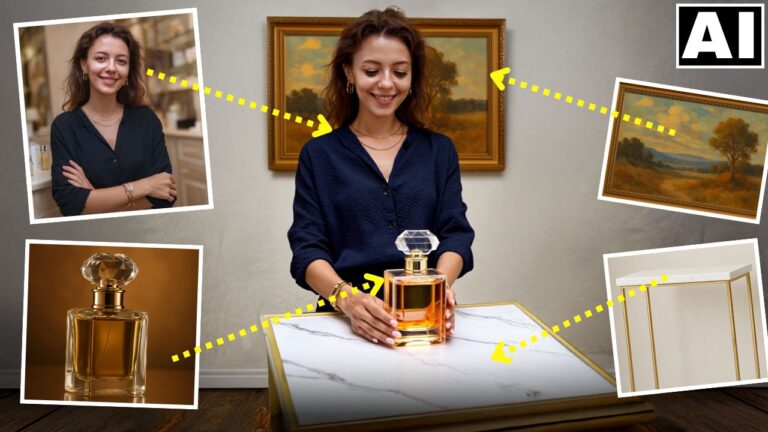
In this video we will be seeing how to transform an ordinary looking shot of a perfume bottle into something much more professional simply by writing prompts, using the all new Google Gemini 2.0 Flash AI Image Editor. We will also be using some other free AI tools to achieve the final outcome. Here’s the video:
Video Summary
This video demonstrates how to use the new Google Gemini 2 Flash AI to transform ordinary photos into professional-grade product photography shots.
Key Highlights & Summary
- Prompt-Based Scene Creation: The presenter uses Gemini 2 to generate an entire professional environment for a perfume bottle from a simple smartphone photo [01:09]. By using detailed prompts—often refined through ChatGPT—the tool adds dramatic elements like smoke, red roses, and crushed ice [02:59, 03:47].
- Advanced Text and Angle Control: Gemini 2 is capable of accurately replacing text on product packaging [04:24] and generating different camera angles (e.g., side profile or top-down view) from a single reference image [04:30, 04:54].
- Correcting AI Imperfections: Since AI can sometimes alter subtle details of a product (like bottle patterns), the video showcases two ways to fix these:
- Photoshop Beta: Using “Generative Fill” with a reference image to precisely restore the original product pattern [07:33, 08:35].
- Fooocus AI (Free): A powerful, free alternative to Photoshop that uses “mixing image prompt” and “in-painting” to blend the original product details back into the AI-generated scene [09:05, 10:38].
- Quality Retention: The presenter notes that image quality degrades after multiple prompt iterations, so it is best to stick to 2-3 prompts per session [05:05]. Final results should be processed through an AI upscaler like I Love IMG for professional resolution [11:21].
The video concludes that AI is rapidly shifting photography and editing from skill-based crafts to knowledge-based processes [11:57].
Important Links
Link to download the image shown in the video:
For other important links to the tools shown in the video, please watch the video on YouTube app/website, since the links are in the description of the video.