Combine FOUR Images to Create ONE Using Flux Kontext Max in OpenArt
In this video we will be seeing how to use a new feature in the all-in-one AI app called OpenArt, where you can use the all new Flux Kontext Max model with 4 reference images using the omni-reference feature, so basically you can combine the different elements in these images to form a single image. Here’s the video:
Video Summary
This video demonstrates how to use the new Flux Context Max model in the OpenArt AI application to combine elements from up to four different reference images into a single output image [00:00].
Here is a brief summary of the process:
- Model Selection: The user navigates to the OpenArt website, selects the “Create Image” feature, and ensures the Flux Context Max model is chosen, as it offers superior results compared to Flux Context Pro, especially for the four-image “omni reference” feature [01:06].
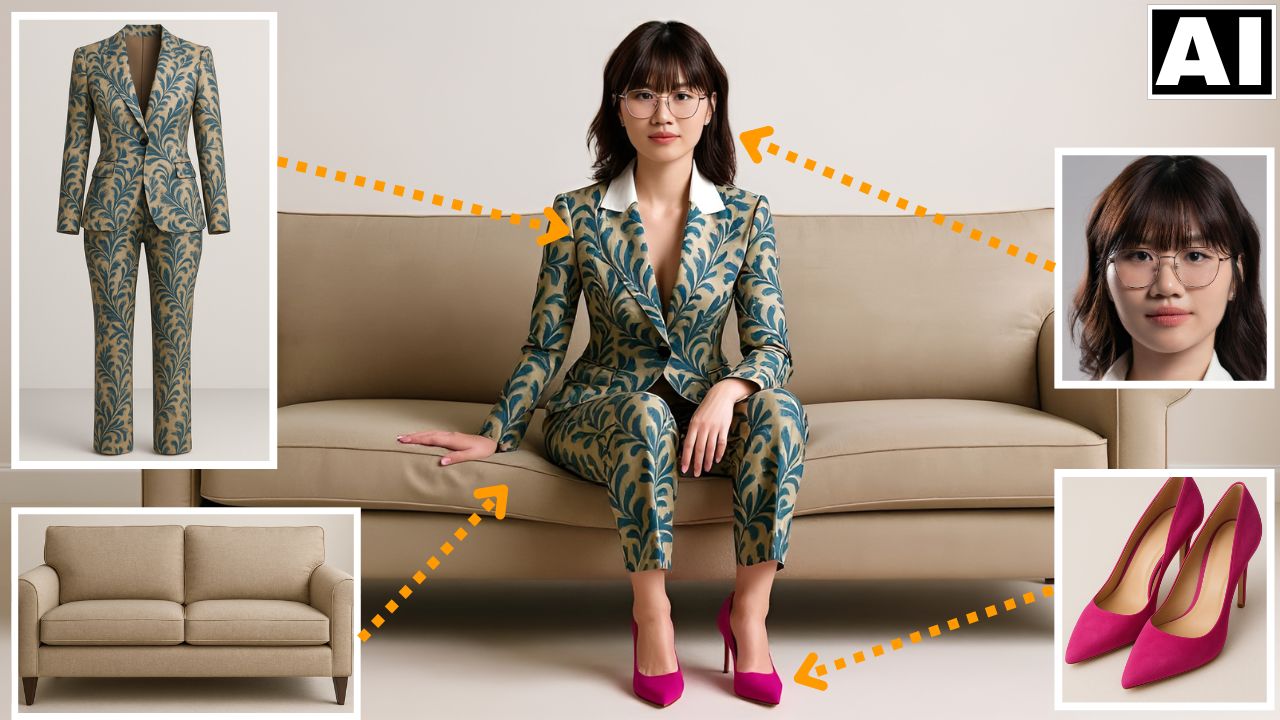
- Image Upload & Prompting: Four separate reference images are uploaded: a woman’s headshot, an elaborate suit, pink heels, and a couch [01:53]. The user then utilizes an AI tool like ChatGPT to generate a descriptive prompt that instructs the model to combine these elements—specifically, to have the woman wear the suit and heels while sitting on the couch [02:04].
- Generation and Review: After setting parameters like the number of output images and the aspect ratio (a widescreen ratio was chosen to accommodate the couch) [02:27], the model generates the results. The output successfully combines all four elements with good consistency in the face, suit pattern, heels, and couch [03:03].
- Upscaling and Refinement: The user selects the best result and demonstrates the OpenArt feature to upscale the image. An important step here is adjusting the setting to prevent the upscaling process from changing the woman’s face [03:37].
The video concludes by noting that this ability to realistically combine elements and maintain consistency across complex patterns and faces is a significant development in AI image generation [04:30].
Important Links
Link to download the image used in the video:
Link to Open Art AI: