Make AI Skin Realistic With 1 Click – Higgsfield Skin Enhancer
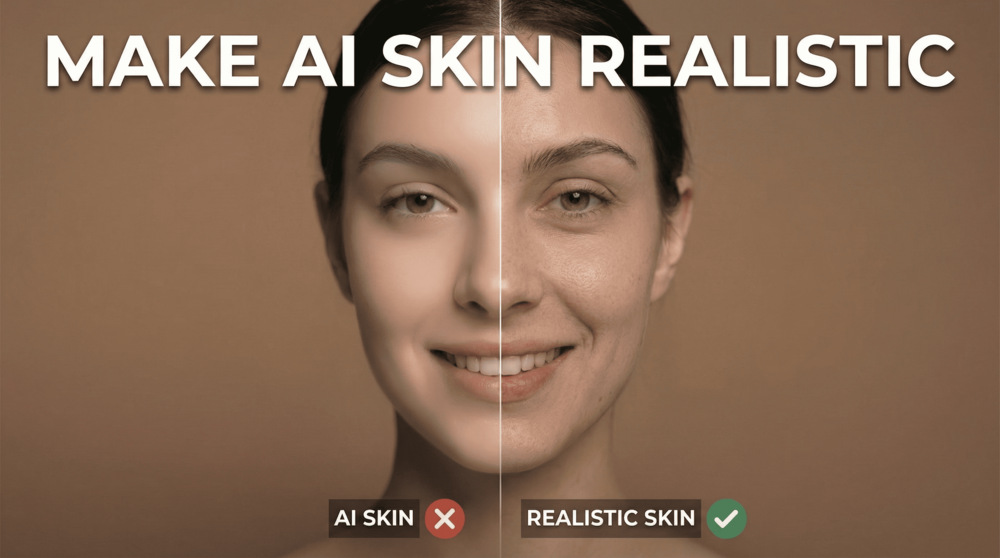
In this video tutorial we will be looking at the all new Skin Enhancer tool by Higgsfield AI, which adds real looking texture and details to smooth AI skin, thereby making it look more realistic. This is a great alternative to Enhancor AI. Here’s the video:
Video Summary
This video reviews Higgsfield AI‘s new Skin Enhancer tool, designed to fix the overly polished, artificial look common in AI-generated images.
Key Takeaways:
- One-Click Solution: The tool quickly adds realistic texture to “smooth” AI portraits, removing the plastic look.
- Three Enhancement Modes:
- Soft Skin: Adds subtle texture; often good for portraits that need a light touch.
- Realistic Skin: The recommended default for a balanced, natural look.
- Imperfect Skin: Not recommended by the reviewer as it tends to add excessive blemishes and bad texture.
- Creative Upscaling: Beyond skin texture, the tool functions as a 4K upscaler, sharpening blurry images without altering facial features.
- Video Creation Benefit: Adding texture is crucial before converting AI images to video (using tools like Luma or Runway), as video generators often smooth images further.
- Cost & Value: The tool is part of Higgsfield’s $9/month basic plan. The reviewer notes this offers better value than competitors like “Enhancer AI” since the subscription includes access to Higgsfield’s entire suite of AI tools.
Important links:
Images used in examples – Click here to download