Higgsfield AI REFERENCE Lets You Become Anyone With a Single Click
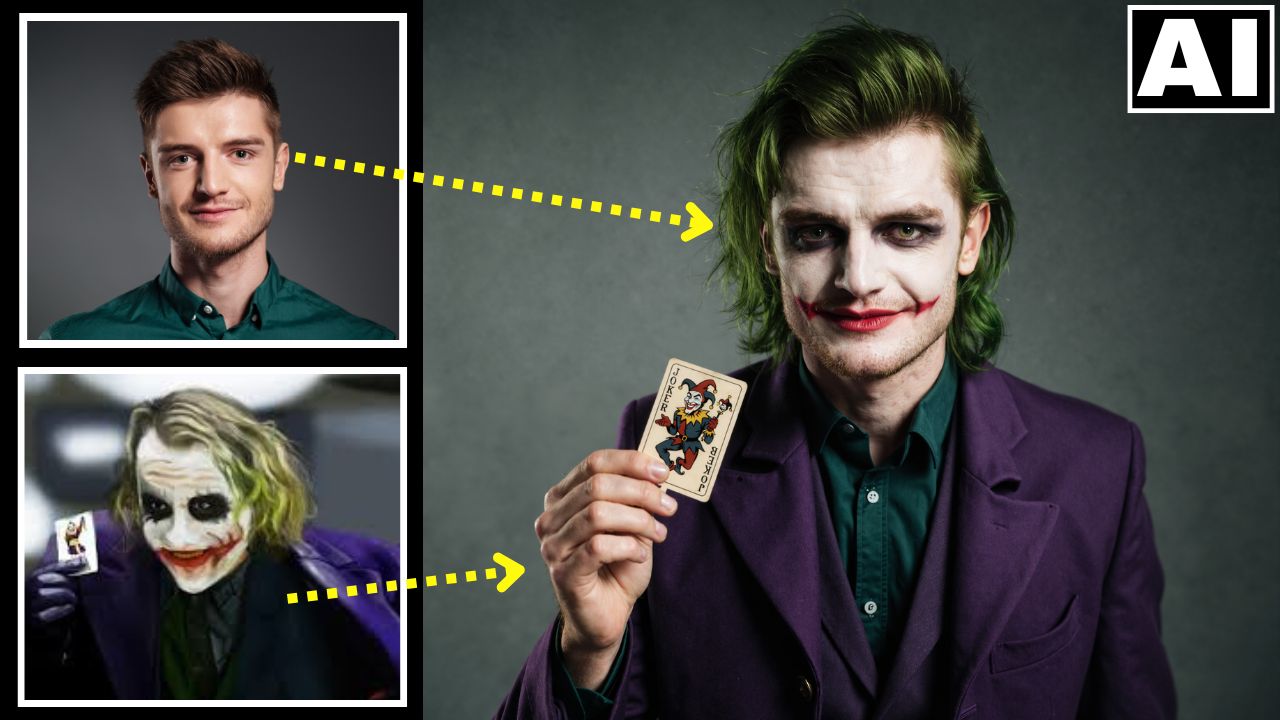
In this video tutorial we will be seeing how the brand new Reference feature (formerly called as Steal) by Higgsfiled AI works. This is a browser extension that allows you to use any picture on the internet as a reference image and create an image similar to it in Higgsfiled Soul with a single click. When combined with Higgsfield Character, this is one of the fastest ways to create consistent characters. We will also be seeing how to use it for product edits by combining it with Higgsfield Canvas. Here’s the video:
Video Summary
This video introduces Higgsfield AI Reference (formerly “Higgsfield Steal”), a browser extension that allows users to replicate the style of any image found on the internet using AI.
Key Takeaways:
- One-Click Style Copying: You can right-click any image on Google, Instagram, or Pinterest and select “Recreate with Higgsfield” to generate a new image in that exact style without needing complex prompts [00:11].
- Installation: The tool functions as a browser extension for Chrome, Edge, or Brave and can be installed directly from the Higgsfield AI website or extension store [01:23].
- Character Consistency: By combining this tool with Higgsfield Character, users can upload their own photos to train the AI. This allows you to apply copied styles to a consistent identity, such as turning yourself into the Joker or Iron Man [03:46].
- Product Photography: The tool is effective for creating professional product shots. You can find a reference image for style [06:52], generate a similar background, and then use Higgsfield Canvas to mask and replace the AI object with your actual product photo [07:40].
- Pricing: While the extension works on the free account, the creator recommends the basic paid plan ($9/month) for significantly faster generation times [01:48].
Important Links
Link to Higgsfield AI: