Midjourney (Omni-Reference) + Ideogram AI (Magic Fill) = INSANE Product Placement
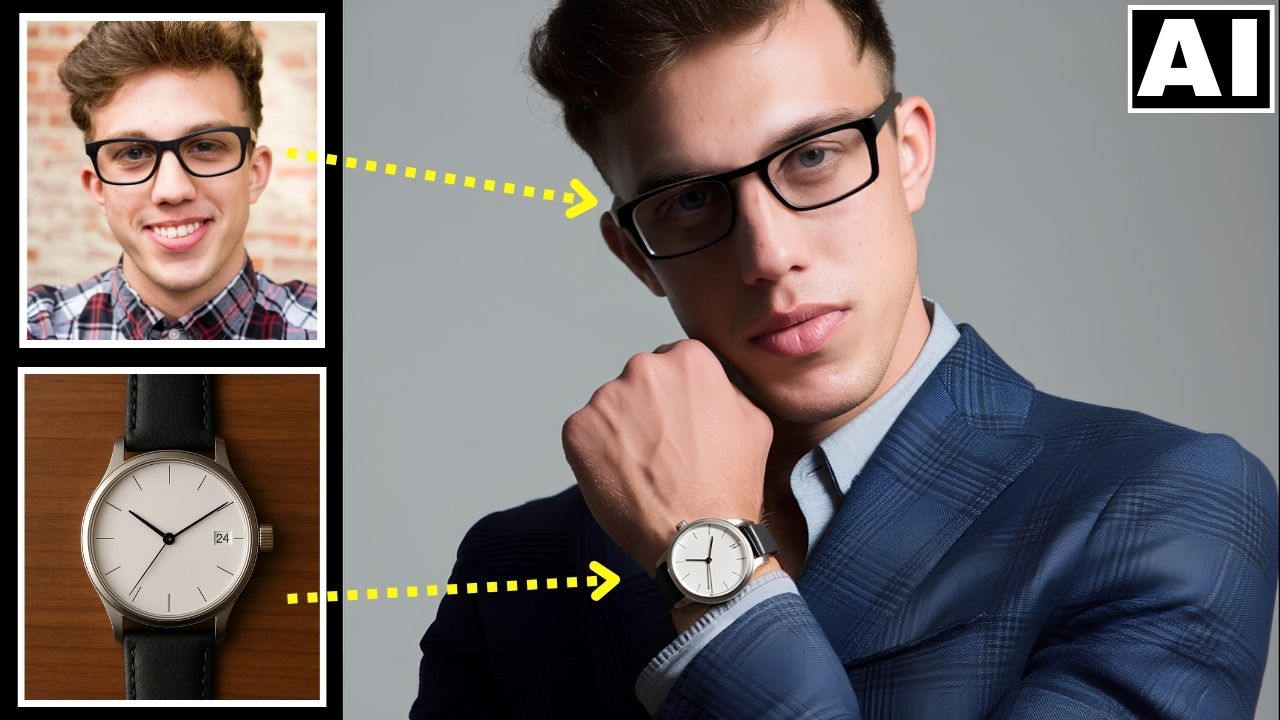
In this video we will be seeing how to turn an ordinary portrait into a professional model for a watch and then also replacing the watch in the AI image with our own watch. For the first task, we will be using the Omni-Reference feature in Midjourney to create a consistent character. For the second task, we will be using the Magic Fill feature inside Ideogram AI to do the replacement seamlessly. We will also be using some other AI tools like ChatGPT AI to achieve the final result. Here’s the video:
Video Summary
This video demonstrates a powerful workflow combining Midjourney and Ideogram AI to create professional product placement images with consistent models.
Key Workflow Steps:
- Model Generation (Midjourney): Using the Omni-Reference feature in Midjourney V7, the creator turns a regular person into a professional model [01:46]. A strength value of 250 was found to maintain the best facial consistency [02:26].
- Product Replacement (Ideogram Magic Fill): The model image and the target product (a watch) are uploaded to Ideogram’s canvas [05:05]. A mask is drawn over the model’s wrist to indicate where the watch should be placed [05:50].
- Detailed Prompting: To ensure accuracy, the creator uses
imageprompt.orgto generate a highly detailed description of the watch [07:22]. This is then used in a split prompt: “on the left is [product description]” and “on the right is [model description]” [07:46]. - Alignment & Framing: For Magic Fill to work, both the product image and the masked area must fit within the tool’s pink selection frame [08:16].
- Refining Details: The same “Magic Fill” process is repeated to change smaller details, such as replacing the model’s spectacles to match the original reference [11:42].
- Final Polishing: The finished image is upscaled using “I Love IMG” to improve clarity and resolution for commercial use [14:24].
The creator concludes that these AI advancements are drastically lowering the barrier for high-end commercial photography [14:40].
Important Links
Link to download the image shown in the video:
For other important links to the tools shown in the video, please watch the video on YouTube app/website, since the links are in the description of the video