NEW Google Gemini AI Editor Can Change Angle & Lighting in Real Estate Shots
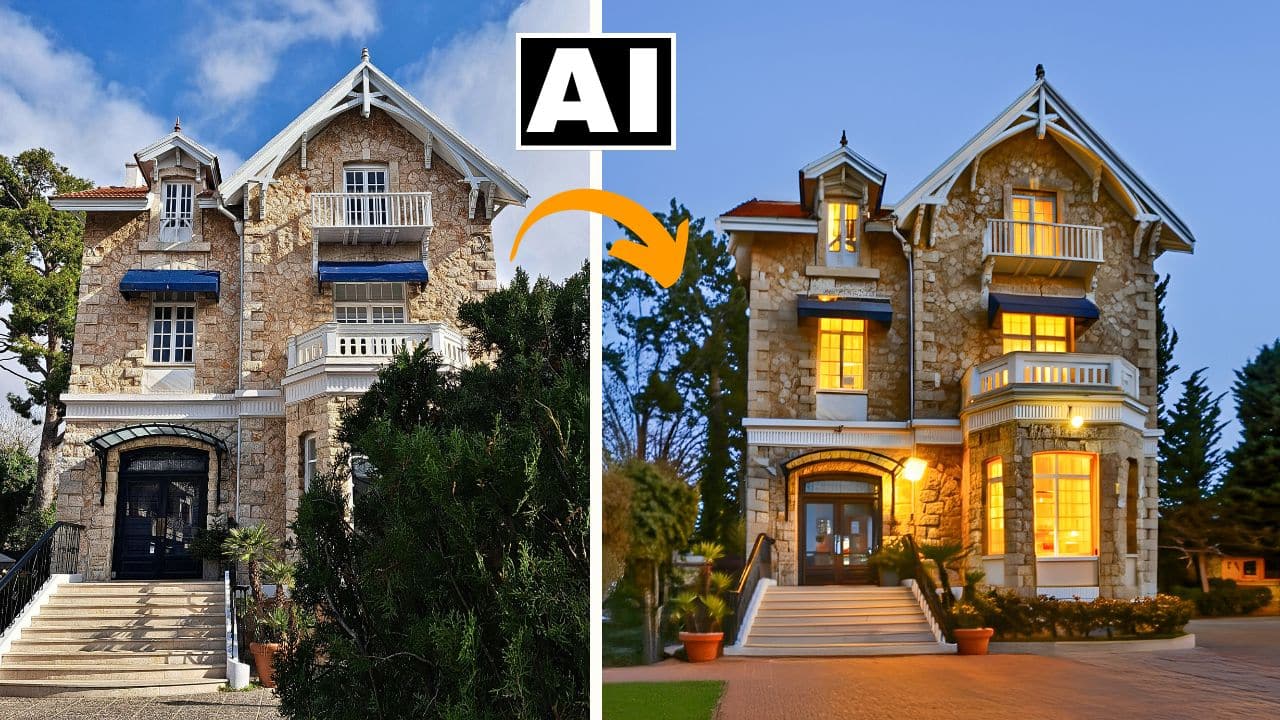
In this video we will be seeing how to the all new Google Gemini 2.0 Flash AI Image editor to edit real estate shots, by changing the angle and lighting of the original show simply by writing a text prompt. We will also be using a bit of Photoshop to achieve the final result. Here’s the video:
Video Summary
This video demonstrates a powerful real estate photo editing workflow that combines Google Gemini 2 Flash AI for creative transformation with Photoshop for technical precision.
Key Highlights & Summary
- Gemini 2 for Scene Transformation: The presenter uses Gemini 2 to transform a house shot under harsh daylight into a professional evening shot [01:03]. With a single prompt, the AI successfully:
- Photoshop for Technical Refinement: Contrary to claims that AI will “kill” Photoshop, the video argues they are better used as a team [00:16]. Photoshop is used to:
- Correct vertical and horizontal perspective distortions using Camera Raw Filter [04:24].
- Adjust shadows and clarity to brighten the AI’s output [04:41].
- Use Generative Expand to recover parts of the image lost during perspective correction [06:12].
- Remove unwanted AI-generated artifacts, such as extra chimneys [06:41].
- Creative Upscaling: For the final professional finish, the image is processed through Deep Dream Generator [07:00]. This “creative upscaler” sharpens textures and removes graininess while maintaining the structure’s original resemblance [08:02].
The tutorial concludes that by combining these free and accessible AI tools, anyone can turn an ordinary real estate snapshot into a high-end marketing image [08:34].
Important Links
Link to download the image shown in the video:
For other important links to the tools shown in the video, please watch the video on YouTube app/website, since the links are in the description of the video.