Turn People Into Cartoons in Photoshop | Cartoonize and Caricature Effect in Photoshop! (VIDEO TUTORIAL)
In this video tutorial we will be learning how to convert a regular image into a cartoon. This is called as the Caricature or Cartoon Effect in Photoshop.
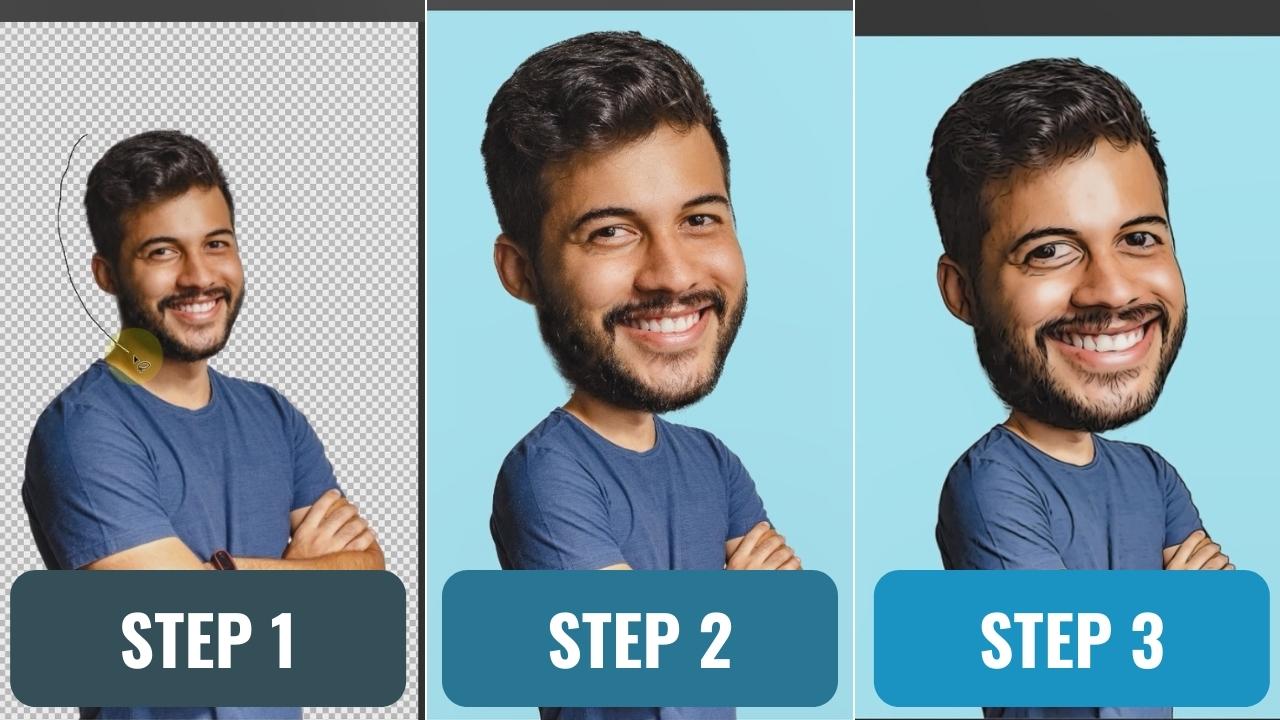
This is a two-step process where we first distort the head and the body of the person to make them look like comic characters or cartoons. And then we work on their facial features and skin to complete the cartoon or comic style look.
Here is the video:
Video Summary
This comprehensive tutorial by Creative Pad Media teaches how to transform a standard portrait into a professional-looking cartoon or caricature using advanced Photoshop techniques.
Summary of the Cartoonize Process
- Disproportionate Distortion: The first step in creating a caricature is making the body look irregular. The instructor cuts out the subject’s head [06:08] and puts it on a separate layer, then uses Transform (Ctrl/Command + T) to make the head larger and the body smaller [07:08].
- Face-Aware Liquify: After converting the layers to a Smart Object, the instructor uses the Liquify filter [15:18]. The Face-Aware tools are used to distort features—making eyes bigger, widening the smile, and altering the jawline to enhance the cartoon look [17:15].
- Skin Smoothing for Painting Look: To avoid a grainy AI look, the skin is smoothed out using the Oil Paint filter [20:43] and Surface Blur [22:32]. This gives the skin a clean, digital painting texture that serves as a base for the cartoon effect.
- Poster Edges Filter: The Poster Edges filter (from the Filter Gallery) is then applied to create the characteristic cartoon outlines and tonal segments [24:41].
- Adding Highlights and Sharpness: A Diffuse Glow filter adds light highlights to the face [25:53]. To regain lost detail, a High Pass filter is applied with an Overlay blending mode, which adds a final punch of sharpness and texture to the eyes and hair [29:48].
- Non-Destructive Masking: To prevent filters from affecting the background, the instructor demonstrates how to use Layer Masks to selectively apply effects like the diffuse glow only to the subject’s skin [32:41].