What Does Stylized Mean in Midjourney? Low vs Medium vs High
Welcome to this video, where we’ll dive into what Stylized means in MidJourney and how it affects your images! We’ll explore the differences between Low, Medium, and High stylization levels, helping you understand how each setting influences the look of your AI-generated art. Additionally, we’ll discuss how the Raw setting works in conjunction with the Stylized option, giving you more control over your creative output. Let’s get started and explore these exciting features!
This video is from our Midjourney AI for Beginners Course.
Video Summary
The instructor clarifies the common confusion between “Style” (like cartoon or sketch) and Stylize. He defines Stylize as a measure of the AI’s “Artistry” and deviation from the prompt—essentially how much the AI “paints outside the lines.”
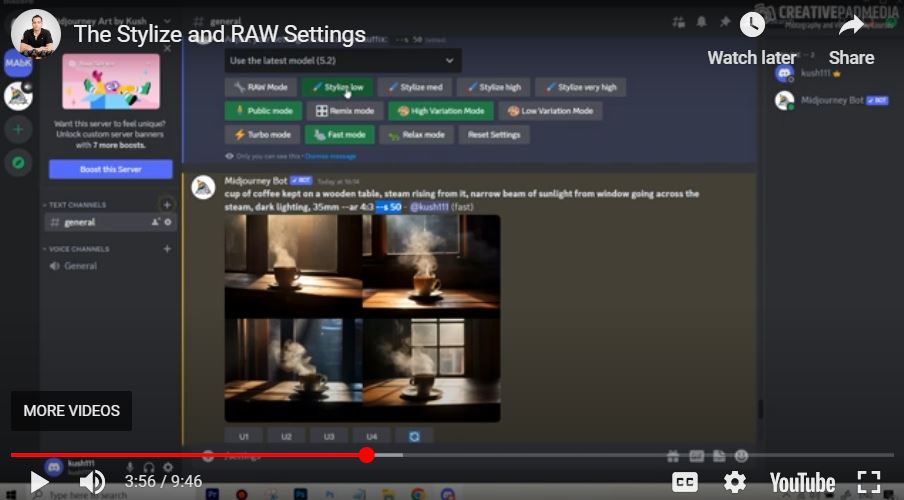
- Stylize Low: Sticks strictly to your words but may look plain.
- Stylize Very High: Adds massive detail (like unprompted coffee beans or candles), but risks ignoring specific parts of your prompt.
- Raw Mode: Acts as a “manual pilot” mode. It strips away Midjourney’s default aesthetic “beautification,” requiring the user to write longer, more descriptive prompts to get high-quality results.
Time Stamps
- 0:12 – How to access the menu using the
/settingscommand. - 1:07 – Introducing the Stylize row (Low, Medium, High, Very High).
- 1:34 – Crucial Distinction: Explaining the difference between “Style” and “Stylize.”
- 2:14 – Comparing Stylize to the Image Weight (
--iw) parameter. - 3:16 – Example: Stylize Low (
--s 50). Literal interpretation of a coffee cup prompt. - 5:04 – Example: Stylize Very High (
--s 750). Showing how Midjourney adds creative props like candles and leaves automatically. - 6:44 – Explaining Raw Mode: Reducing the AI’s default aesthetic bias.
- 7:18 – The drawback of Raw Mode: Why short prompts often look “amateurish” in this setting.
- 8:30 – Who should use Raw Mode? (Users who prefer long, elaborate prompts and total control).
- 9:34 – Instructor’s Recommendation: Sticking to defaults for a balanced experience.